Minecraft Java · Forge & NeoForge

Never lose your base again with WayPoints Mod

WayPoints Mod adds fast, readable waypoints and a clean HUD compass to Minecraft Java. Mark your base, mines, portals and friends, then follow on-screen markers back from anywhere — across the Overworld, Nether and End.
Free download Forge + NeoForge 1.20.1 → 1.21.x Client-side friendly
1.20.1–1.21.x
Supported versions
2
Mod loaders
∞
Waypoints per world
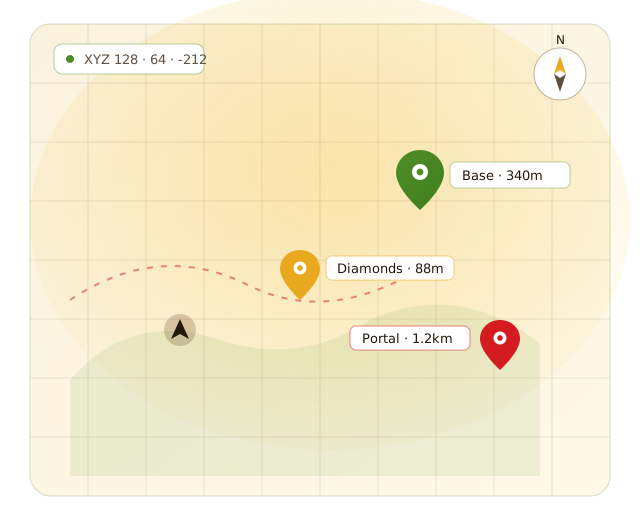
Minecraft minimap HUD showing waypoint markers with distances
Base · 340m
Diamonds · 88m
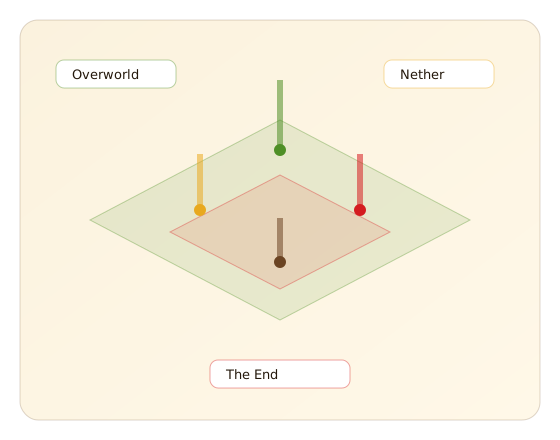
World overview with beacon waypoints across the Overworld, Nether and End
What is WayPoints Mod

A navigation layer built for real survival play

Minecraft worlds are huge, and the deeper you explore the easier it is to lose the way home. WayPoints Mod fixes that with a lightweight waypoint system that turns any coordinate into a marker you can actually follow.

  • Colour-coded markers. Group bases, ores and portals by colour so a busy map stays readable.
  • Direction & distance. Every waypoint sits on the HUD compass with a live block count.
  • Death recovery. Optional death waypoints mark where you fell so you can get your gear back.
  • Per-dimension. Overworld, Nether and End waypoints stay neatly separated.
See all features
Features

Everything you need to navigate

A focused toolkit of waypoint and HUD features — no bloat, no clutter, just the tools that get you home.

Custom waypoints

Drop a marker anywhere and give it a name, colour and category. Bases, ore veins, villages, farms — keep them all one glance away.

HUD compass & markers

A clean heading strip shows every active waypoint in the right direction with a live block distance, so you can navigate without opening a map.

Death waypoints

Auto-drop a marker where you died so you can sprint back and recover your gear before it despawns.

Dimension aware

Overworld, Nether and End waypoints stay separate, and the mod understands the 8:1 Nether ratio to help you align portals.

Fast to manage

Add, rename, recolour, hide or delete waypoints from one tidy list — or bind a quick-add key for one-press markers.

Lightweight & client-side

Built to sip performance and run on your client, so it works on most servers with no server install required.

How it works

From download to first waypoint in four steps

No config files to hand-edit. Install a loader, drop the mod in, and you are marking the map in minutes.

Install a loader

Add Forge or NeoForge for your exact Minecraft version through the official installer.

Add the mod file

Drop the matching WayPoints Mod file into your .minecraft/mods folder.

Open the menu

Launch the modded profile and open the waypoint menu with the mod's hotkey.

Set & follow

Add a waypoint, pick a colour, and follow the HUD marker straight to it.

Compatibility

Built for modern Minecraft Java

WayPoints Mod targets current Minecraft Java releases on the Forge and NeoForge loaders. Always download the build that matches your exact version — a file made for one version will not load on another.

  • Forge — for supported legacy and current buildsSupported
  • NeoForge — the default loader on newer versionsSupported
  • Java Edition — Windows, macOS & LinuxRequired

Supported Minecraft versions

Pick the matching WayPoints Mod build for your version:

1.20.11.20.41.20.61.211.21.11.21.31.21.41.21.101.21.11

Not sure which you run? Check the bottom-left corner of the Minecraft title screen.

Use cases

One mod, a dozen ways to stay found

However you play, waypoints turn a sprawling world into a map you can actually navigate.

Bases & storage

Mark your main base, storage rooms and secondary outposts so you never lose the way home after a long trip.

Mining runs

Pin diamond veins, ancient debris and branch-mine entrances, then follow the HUD straight back to the surface.

Nether hubs

Track portals and Nether highways with dimension-aware markers and the built-in 8:1 ratio helper.

Multiplayer meetups

Set a shared meeting point or event location so your group can regroup quickly on a server.

Exploration

Drop markers on biomes, structures and points of interest as you explore, and build a personal atlas of your world.

Builds & projects

Bookmark large build sites and project areas across the map to jump between them without getting lost.

Installation & setup

Set up WayPoints Mod, step by step

The full process, from a clean install to your first marker. It works the same on Windows, macOS and Linux.

1 · Mod loader
Download and run the Forge or NeoForge installer for your Minecraft version, then create the modded profile it adds.
2 · Download
Grab the WayPoints Mod file that matches your version and loader from the Download section below.
3 · Mods folder
Open .minecraft/mods (create it if missing) and move the downloaded file into it.
4 · Launch
Start Minecraft using the Forge/NeoForge profile. WayPoints Mod loads automatically.
5 · First waypoint
Open the waypoint menu with the mod's hotkey, add a waypoint at your location, pick a colour and save.

New to loaders? Follow the Forge install guide or the NeoForge setup guide.

Download

Get WayPoints Mod

Download the latest release and drop it into your mods folder. Free, lightweight and ready for Forge and NeoForge.

.zip package Forge / NeoForge 1.20.1–1.21.x

Tip: match the build to your Minecraft version and back up your world before adding new mods.
WayPoints Mod download package

Download safely

Only download WayPoints Mod from the official link in the Download section. Match the mod build to your exact Minecraft version and loader, keep Forge or NeoForge up to date, and back up your world before installing new mods. WayPoints Mod is a fan-made project and is not affiliated with Mojang or Microsoft.

The honest view

Pros and cons

A quick, balanced look so you know exactly what you are installing.

Pros

  • +Fast, readable waypoints with colour coding
  • +HUD compass shows direction and live distance
  • +Automatic death markers save lost gear
  • +Separate waypoints per dimension
  • +Lightweight and works on most servers
  • +Free, and simple to install

Things to know

  • −Java Edition only — not for Bedrock
  • −You must match the build to your Minecraft version
  • −Some anti-cheat servers restrict client mods
  • −Requires the Forge or NeoForge loader
Release information

At a glance

Latest version
Latest release
Minecraft support
Java Edition 1.20.1 through 1.21.x
Mod loaders
Forge & NeoForge
Side
Client-side (works on most servers)
Price
Free
Distribution
Official project files & platforms such as Modrinth
Troubleshooting

Quick fixes for common issues

Most problems come down to a version or loader mismatch. Start here before reinstalling.

Mod does not appear in game

Confirm the file is in .minecraft/mods and that you launched the Forge/NeoForge profile, not vanilla. A build made for a different Minecraft version will silently fail to load.

Waypoints are not showing

Check that the HUD is enabled in settings and that the waypoint's visibility is turned on. Also make sure you are in the same dimension where the waypoint was created.

Hotkey does nothing

Another mod may share the same key. Open Minecraft's Controls (or the mod's key settings) and rebind the waypoint keys to something free.

Coordinates look wrong in the Nether

Remember the 8:1 ratio — one block in the Nether equals eight in the Overworld. Use the dimension helper rather than comparing raw numbers.

Game crashes on startup

This usually means a version or loader mismatch. Match the mod build to your exact Minecraft version and loader, and update Forge/NeoForge if it is out of date.

Does not work on a server

Some servers block client mods via anti-cheat. Client-side features work on most servers, but always check the server's rules if markers do not appear.

Still stuck? The common errors guide walks through crash logs and fixes.

Guides & blog

Learn WayPoints Mod faster

View all guides
FAQ

WayPoints Mod, answered

Twenty common questions about using, installing and running the mod.

WayPoints Mod lets you place named markers anywhere in your Minecraft Java world and then find your way back to them. Each waypoint appears as a coloured beacon in the world and as a marker on the HUD compass, with the live distance to it, so you always know which way your base, mine or portal is.
Open the waypoint menu with the mod's hotkey, choose “Add waypoint”, and it captures your current coordinates automatically. You can rename it, pick a colour and save. Many players also bind a one-press “quick waypoint” key so they can drop a marker without opening any menu.
Yes. Every waypoint has editable name, colour and visibility settings, so you can colour-code categories — for example green for bases, amber for ores and cyan for portals. Colour coding makes a busy HUD much easier to read at a glance.
They do. Each active waypoint shows its distance in blocks on the HUD and sits on the on-screen compass in the correct direction, so navigating is as simple as walking toward the marker until the distance reaches zero.
When death waypoints are enabled, the mod automatically drops a temporary marker at the spot where you died. That makes it far easier to run back and recover your items before they despawn, instead of guessing where you fell.
Waypoints are organised per dimension, so Overworld, Nether and End markers stay separate and never clutter each other. The mod also understands the 8:1 Nether–Overworld ratio, which helps when you are lining up portals.
Yes. You can toggle any waypoint's visibility to temporarily hide it from the HUD, or delete it permanently from the waypoint list. Hiding is handy when an area gets crowded but you are not ready to remove the marker for good.
WayPoints Mod includes a clean HUD strip that shows your heading and the nearest waypoints. It is designed to be readable without covering the middle of your screen, and the elements can be toggled if you prefer a minimal look.
Waypoints are stored per world/server so that each save keeps its own set of markers. This keeps a single-player world and a multiplayer server from mixing their waypoints together.
Yes, an optional coordinate readout can display your current X, Y and Z position, which is useful for sharing locations with friends or writing down a spot before you set a full waypoint.
Yes. WayPoints Mod is free to download and use. You can grab the latest release from the download section on this site, which points to the official project files.
The mod targets modern Minecraft Java releases, including the 1.20.1 line through the 1.21.x line. Always match the mod build to your exact Minecraft version, because a mod built for one version will not load on another.
Yes. WayPoints Mod is built for the Forge and NeoForge mod loaders. Newer Minecraft versions generally use NeoForge, while some older versions use Forge, so pick the build that matches the loader you have installed.
Install Forge or NeoForge for your Minecraft version, download the matching WayPoints Mod file, then place that file in your .minecraft/mods folder. Launch the game using the modded profile and the mod loads automatically. There is a full step-by-step guide in the setup section above.
No. WayPoints Mod is a Forge/NeoForge mod, so you do not need Fabric. If your pack is Fabric-based you would look for a Fabric-compatible alternative instead, but for Forge and NeoForge profiles this mod is the right fit.
In most cases yes. Because the waypoint and HUD features run on your own client, the mod works on many servers without server-side installation. Some competitive or anti-cheat servers restrict client mods, so always check that server's rules first.
Use the download button in the Download section on this page, which links to the official project files. Avoid random re-upload sites, since those are the most common source of fake or bundled files.
Distribution can include popular mod platforms such as Modrinth alongside the official project files linked here. Wherever you download from, confirm the version and loader match your setup before installing.
For single-player it only needs to be in your own mods folder. For multiplayer, the client-side features work from your machine; a server only needs it if the server operator wants shared or server-managed features.
The mod is designed to be lightweight, and the HUD and markers add very little overhead on typical hardware. If you run a heavy modpack you can hide unused waypoints and disable elements you do not need to keep things smooth.